 ProVisual
3D Architectural Visualization Prices in the USA – 2026
We often receive emails or social media messages asking for a simple price list. While we understand the desire for quick numbers, the truth is that outsourced 3D rendering doesn’t come with standard, one‑size‑fits‑all pricing. Every project is different.
In this guide, you’ll learn what factors shape the cost of 3D architectural visualization in the US, see real price ranges for exteriors, interiors, products, floor plans, and animations, and discover how to keep your budget under control without sacrificing quality.
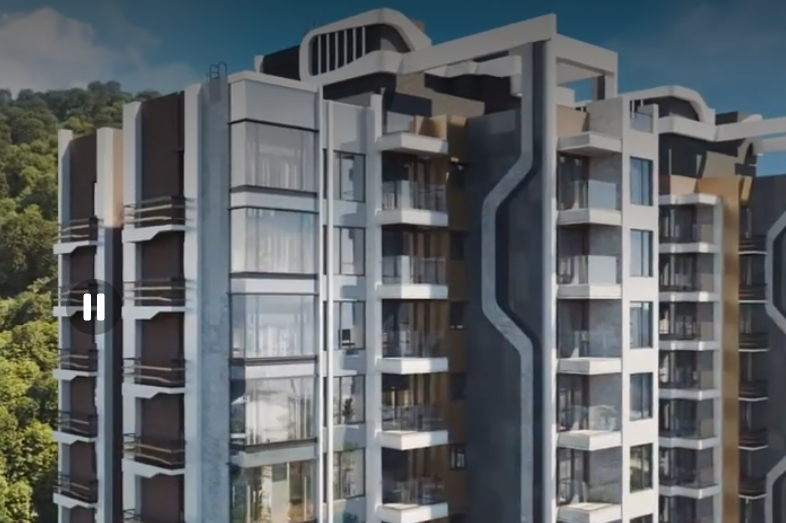
3D Architectural Visualization Prices in the USA
Main Factors That Affect 3D Rendering Costs in the US
The final price of your project depends on several key elements:
Completion time (deadline urgency)
Complexity and project type (exterior, interior, product, animation)
Number of revisions / iterations
Scale of the 3D model
Level of detail (materials, textures, lighting, atmosphere)
Number of images or animation length
Initial data provided (CAD, sketches, reference images, existing 3D models)
Let’s break each down.
Completion Time
Most 3D artists charge an hourly or per‑project rate. The more work and revisions required, the longer the job takes – and the higher the cost. Rendering itself also consumes time: a single high‑res image can take minutes or hours depending on scene complexity, texture resolution, and lighting. Professional studios use render farms to speed this up, which adds to the price.
If you need the project urgently (e.g., for an upcoming planning board meeting or investor presentation), the team will work overtime. Expect a premium for rush delivery.
Level of Complexity & Project Type
The type of project directly impacts complexity. Generally, from lowest to highest cost for static images:
Product rendering → Interior → Exterior
Why? Because exteriors typically require the most context: roads, cars, trees, pedestrians, neighboring buildings, traffic signs, parking lots, and sometimes even the skyline. A kitchen render includes counters, cabinets, windows, and furniture – a business center exterior includes all that plus the street life.
Camera angle also matters. A human‑eye view is standard. Aerial or semi‑aerial views require more modeling (rooftops, site context). Close‑up hero shots of a facade or a leather sofa need high‑resolution textures and dramatic lighting.
Animation is always more expensive than still images – just as video production costs more than photography. Virtual tours (360° VR) fall between static renders and full animation in price because they require optimization, multiple render passes, and interactive setup.
Number of Iterations
Every studio has its own revision policy. At ProVisual.pro, we typically offer a set number of revision rounds (e.g., 2–3), but we can adjust to your workflow. More revisions mean more artist hours and higher cost. Conversely, clear and timely feedback from your side keeps costs down.
Scale of the Model
A single‑family villa requires far fewer polygons and environmental details than a downtown office tower. However, architectural style also matters: a minimalist villa is easier (and cheaper) to model than a deconstructivist building with complex curves and unusual angles.
Level of Detail (LOD)
Two villas can have very different price tags. One may use only concrete and glass – the other combines stone, wood, metal panels, and custom landscaping. Lighting and atmosphere (sunset, fog, night, golden hour) also add to the artistic effort. Adding people to a scene is an extra service that requires a specialist, increasing cost.
Seasonality matters too. Autumn and winter scenes – falling leaves, snow, bare trees, low sun angles – are harder to do photorealistically than spring or summer. Expect a small premium for non‑standard seasons.
Number of Views
The total number of images directly multiplies the cost. Most architects order between 3 and 7 views of a project. Some clients need just one hero shot; others (e.g., furniture manufacturers) may order 50 images for a catalog. 3D product rendering is often far more cost‑effective than traditional photography for such volumes.
For animation: you might need eight 15‑second clips or one 3‑minute walkthrough. Prices scale accordingly.
Amount of Initial Data Provided
The more you give us upfront – detailed CAD drawings, mood boards, material samples, reference photos, or existing 3D models – the less time we spend recreating things. That lowers your bill. Conversely, if you provide only a rough sketch or low‑quality model, we’ll need to model from scratch or optimize, adding cost.
Example: Virtual staging (adding furniture to an existing photo) is much cheaper than full 3D modeling. Send us a photo, and in a few days you’ll have a fully furnished room.
Price Differences by Quality Level (Junior, Middle, Senior Artists)
At ProVisual.pro, we match artists to your budget and quality expectations:
Low‑budget – Junior artist. Suitable for early design concepts or internal reviews. Less detail, simpler lighting.
Medium cost – Middle artist. High‑quality work, competitive pricing. Perfect for marketing and client presentations.
High‑end / premium – Senior artist. Ultra‑photorealistic, massive detail, cinematic lighting. For luxury projects, large‑scale developments, or top‑tier marketing campaigns.
Objects and spaces also have built‑in complexity grades:
| Complexity | Interiors (examples) | Exteriors (examples) |
|---|---|---|
| Low | Bathrooms, small bedrooms, corridors, utility rooms | Single‑family villa, simple facade close‑up |
| Medium | Kitchens, living rooms, complex bedrooms, small lobbies | Medium residential complex, small business center |
| High | Spas, spacious lobbies, public spaces, luxury penthouses | Aerial views of entire neighborhoods, large mixed‑use towers, skyscrapers |
Price Ranges for Different Types of 3D Rendering Services (US Market)
After analyzing dozens of CGI studios across the US, here are the typical market ranges.
ProVisual.pro offers quality at the lower end of these ranges – or below – while maintaining premium output.
| Service Type | Typical US Market Range |
|---|---|
| Exterior still render | 900–3,200 per image |
| Interior still render | 1,400–2,600 per image |
| Product rendering | 150–900 per image |
| 3D Floor Plan | 600–1,500 per image |
| 360° VR Tour (per space) | 1,500–2,500 |
| Architectural Animation | 6,000–12,000 per minute |
Note: These are market averages. ProVisual.pro typically delivers exterior renders starting at 750–2,200, interiors from 800–1,900, and animations from $2,500 per minute – significantly below many US competitors without cutting quality.
How to Get High‑Quality Renders at a Reasonable Price with ProVisual.pro
Provide detailed specifications – The more structured your brief (CAD files, references, materials, desired camera angles), the less time we spend guessing. That saves you money.
Use existing 3D models – If you have accurate models (Revit, SketchUp, 3ds Max), share them. We can often use them directly or with minor optimization.
Limit revisions – Plan ahead and give clear feedback in fewer rounds. Unlimited changes sound nice, but they add cost. We offer a fair number of included revisions.
Become a regular client – If you have 10–20 images per month, we can assign a dedicated team and offer special ongoing rates. Volume discounts apply.
Consider virtual staging for real estate – For existing buildings, virtual staging (adding furniture to a photo) is dramatically cheaper than full 3D modeling of an empty space.
Conclusion
3D architectural visualization pricing in the US is never a single number. It depends on complexity, quality, deadlines, revisions, and the amount of initial data you provide. That’s why professional studios – including ProVisual.pro – don’t publish a simple price list. Instead, we offer free consultations and custom quotes based on your specific project.
Ready to get an accurate, fixed‑price quote for your US project?
Contact us via email or through our website.
Email: mail@provisual.pro
US office: 33 Irving Pl, New York, NY 10003, United States
We also offer a free 15‑minute consultation (video or phone call). Let’s review your plans and give you a transparent, line‑item estimate – no obligation.
How We Help You Rank on Google for 3D Rendering Services Across the USA
If you are a US‑based architect, developer, or marketing professional looking for 3D visualization services, you’ve probably searched for terms like “3D architectural rendering near me” or “best CGI studio for residential towers.” To help local clients find us – and to help you understand how to promote your own rendering services – we follow a few proven Google‑friendly strategies:
Target City + Service Pages
We create dedicated pages for major US cities: New York, Los Angeles, Chicago, Houston, Dallas, San Francisco, Miami, Seattle, Boston, Denver, Atlanta, Washington DC, and more. Each page speaks to local architecture styles, climate, zoning quirks, and notable projects. This helps Google match our content to location‑specific searches.
Answer Real Questions (FAQ)
We include honest, detailed FAQ sections on every page – answering what clients actually ask: “How much does exterior rendering cost in Austin?” or “Do you understand historic preservation rules in Savannah?” Google rewards content that directly answers search queries.
Use Case Studies & Local Examples
We share anonymized project examples with budgets and deliverables for specific neighborhoods (e.g., *“Mixed‑use tower in Downtown Brooklyn – 6 views + animation – 6,500–12,000”*). This builds trust and provides concrete data that search engines see as valuable, unique content.
Optimize for Mobile & Page Speed
Most of our clients browse on phones or tablets. We keep our site fast, clean, and easy to navigate. Google prioritizes mobile‑friendly, fast‑loading pages.
Build Legitimate Backlinks
We collaborate with architectural blogs, real estate forums, and industry publications to earn links. We never buy low‑quality links. Natural, relevant backlinks from trusted sites signal authority to Google.
Collect and Showcase Client Reviews
Verified client testimonials (with permission) on our site and on Google Business Profile help local SEO. Positive reviews with location keywords (e.g., “Best 3D rendering for our Phoenix condo project”) boost visibility.
Keep Content Fresh
We regularly update price guides (like this one) and add new portfolio pieces. Google favors recently updated, relevant content.
Want to rank your own 3D visualization business across the US? Follow the same principles: local pages, honest FAQ, real data, mobile optimization, quality backlinks, and authentic reviews. And if you’d rather focus on your projects – let ProVisual.pro handle both the rendering and the digital marketing. We’re a one‑stop shop for architects and developers.
Get in touch today:
mail@provisual.pro
33 Irving Pl, New York, NY 10003, USA